Book a finite recurring series
Preview every date before choosing which sessions to confirm.
Before you start
Access to an active student. A finite end date within the center’s booking horizon and published capacity on the chosen dates.
Open the parent workspaceSteps
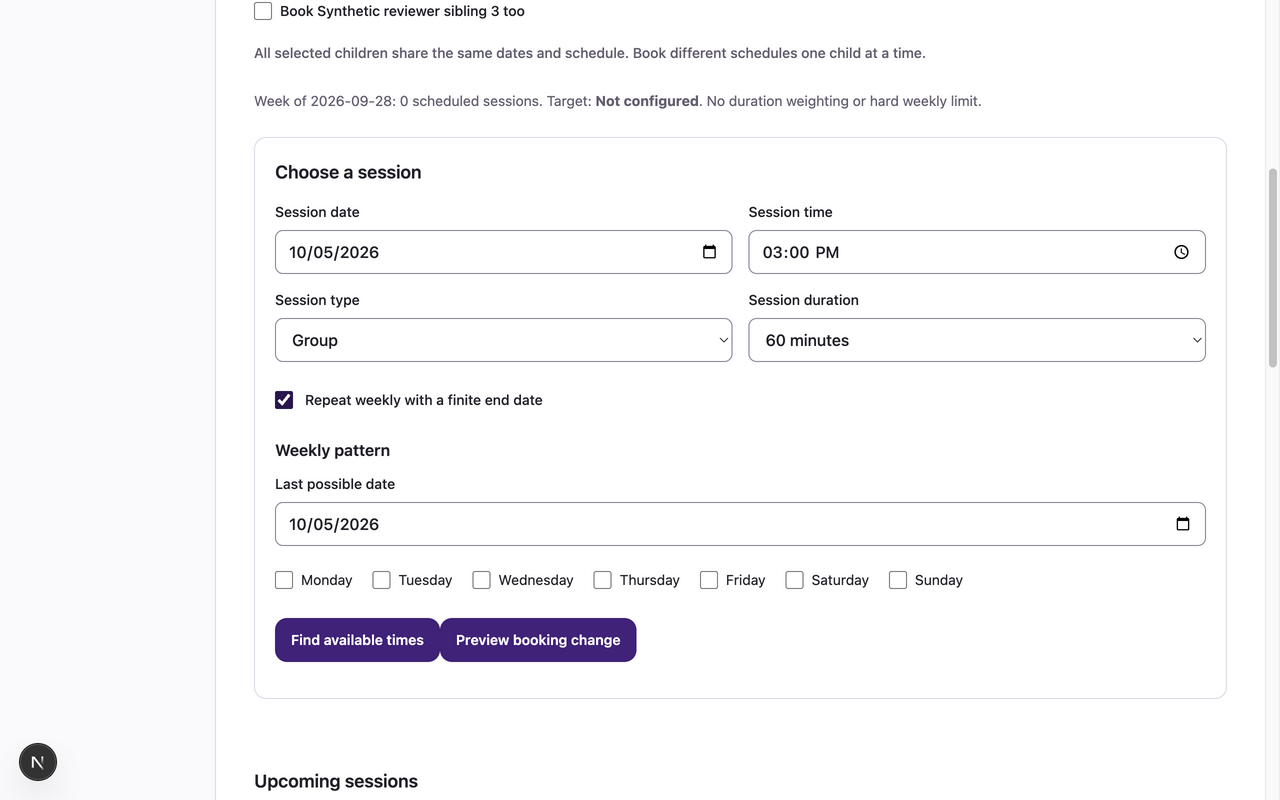
- Open My Sessions and choose Booking student. In Choose a session, enter Session date, Session time, Session type and Session duration.
- Select optional Book <child> too choices for siblings on the same schedule; book different schedules one child at a time. Check Repeat weekly with a finite end date. In Weekly pattern, set Last possible date and choose the weekday checkboxes. The last possible date is inclusive, not a promise that every date is bookable.
- Choose Preview booking change. Review each center-local date, time, status and explanation. Unavailable/full/closed/unpublished dates cannot be selected.
- Under Explicitly select dates to confirm, check only the available dates you want. Read the displayed policy and check its acknowledgment.
- Choose Confirm selected dates. In Upcoming sessions, verify the actual confirmed dates and Last confirmed date in series.
What to expect
Every selected child is booked on every explicitly selected available date, as one atomic batch with separate child series. The series is finite; unselected or unavailable dates are not silently added later.
If something goes wrong
- Across daylight-saving changes, weekly patterns use the center’s local dates and wall-clock time. Review every preview row; nonexistent or ambiguous local times are rejected instead of shifted silently.
- If a date becomes unavailable or the preview expires, preview again and reselect dates. Existing confirmed sessions stay intact when a new confirmation fails.
- For a full date, use Waitlists and offers separately. A weekly target is guidance and does not reserve recurring capacity.
Examples from a synthetic center
Screenshots use fictional people and sample dates/policies. Your center’s labels, dates and configured values may differ. All steps above are complete without images.